Scream Jam Controls
PC movement, camera and menu keybinds shown by Roblox, plus recorded ability keys for all 12 Scream Jam characters.
This reference separates two control layers. The base movement and menu shortcuts come from the Roblox Help and Settings overlays opened while Scream Jam was running. Character ability keys come from the supplied in-game Info panels. Device, client and accessibility settings can change the Roblox layer.
PC Movement and Camera
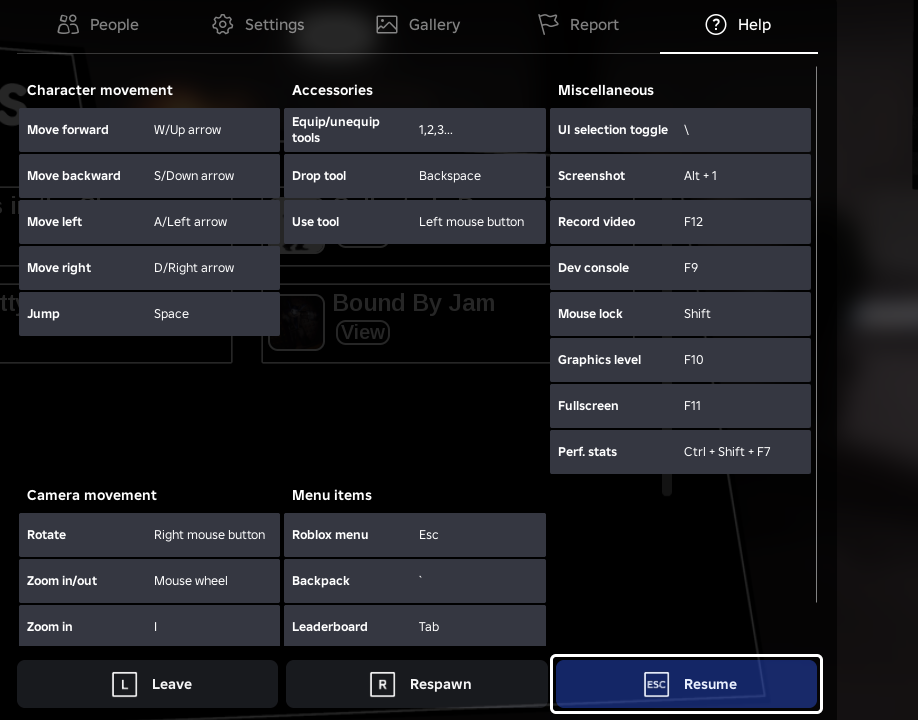
These are the keyboard and mouse bindings shown in the Roblox Help overlay.
Character and camera
Tools and mouse
Camera and Movement Modes
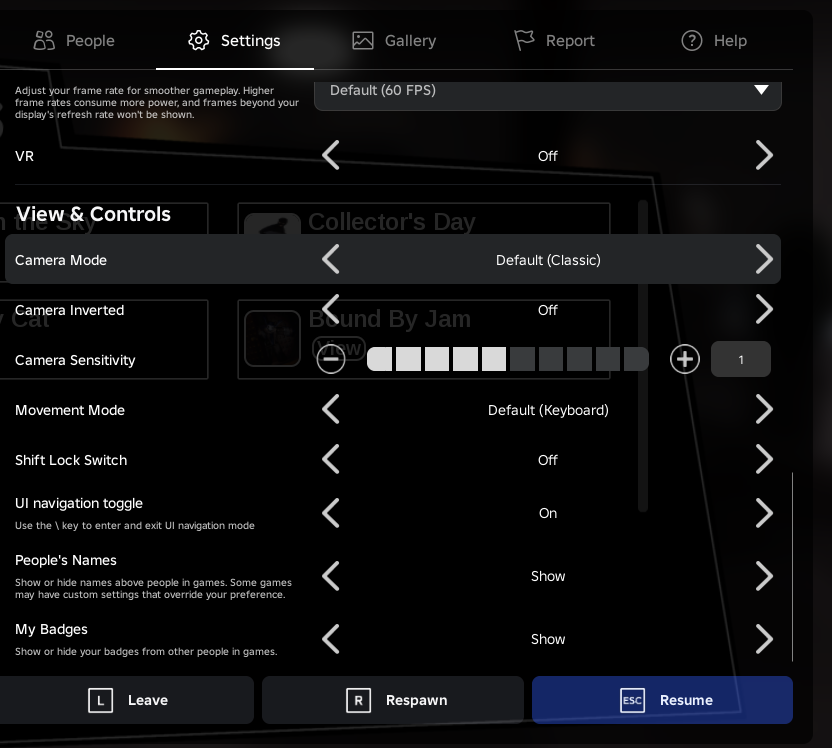
Captured camera options
- Default (Classic)
- Classic
- Follow
- CameraToggle
Captured movement options
- Default (Keyboard)
- Keyboard + Mouse
- Click to Move
These are observed Roblox client options, not Scream Jam-specific presets. Availability can differ by device and Roblox client version.
Character Ability Keys
Ability names, slots and cooldown labels below are transcribed from the August 2026 Scream Jam Info panels. Open a character name for the full ability descriptions.
- Q
- Throw20s
- E
- Stalk15s
- R
- Hide35s
- Click
- Hit1.95s
- Q
- Spin20s
- E
- Change3s
- R
- Boost20-40s
- Click
- Swingvaries
- Q
- Charge30s
- E
- Rage30s
- R
- Howl40s
- Click
- Swing2.1s
- Q
- Distortion34s
- E
- Teleport45s
- R
- Link24s
- Click
- Swing1.95s
- Q
- Tripmine15s (max 5, 3 HP each)
- E
- Control25s
- R
- Trajectory1s
- Click
- Shoot2s
- Q
- Shake28s
- E
- Drink42s
- R
- Spill32s
- Click
- Not assigned
- Q
- Launch32s
- E
- Stab40s
- R
- Not assigned
- Click
- Not assigned
- Q
- Antenna60s (max 2)
- E
- Pointer30s
- R
- Restoration35s
- Click
- Not assigned
- Q
- Airball20s
- E
- Basket Hoop40s
- R
- Chocolate30s
- Click
- Not assigned
- Q
- Flower20s (max 5)
- E
- Nutrient24s
- R
- Waterer22s (max 3)
- Click
- Not assigned
- Q
- Rocket40s
- E
- Wall30s (max 3)
- R
- Bomb30s
- Click
- Not assigned
- Q
- Teapot Toss27s
- E
- Pot Shield33s
- R
- Change2s
- Click
- Not assigned
| Character | Q | E | R | Click |
|---|---|---|---|---|
| KillerKyleKiller | Throw20s | Stalk15s | Hide35s | Hit1.95s |
| FencerKiller | Spin20s | Change3s | Boost20-40s | Swingvaries |
| ClawsGuyKiller | Charge30s | Rage30s | Howl40s | Swing2.1s |
| StalkerKiller | Distortion34s | Teleport45s | Link24s | Swing1.95s |
| FrapersKiller | Tripmine15s (max 5, 3 HP each) | Control25s | Trajectory1s | Shoot2s |
| PanchoSurvivor | Shake28s | Drink42s | Spill32s | Not assigned |
| BettySurvivor | Launch32s | Stab40s | Not assigned | Not assigned |
| MrRobotSurvivor | Antenna60s (max 2) | Pointer30s | Restoration35s | Not assigned |
| JimmySurvivor | Airball20s | Basket Hoop40s | Chocolate30s | Not assigned |
| CalindraSurvivor | Flower20s (max 5) | Nutrient24s | Waterer22s (max 3) | Not assigned |
| BloxxerSurvivor | Rocket40s | Wall30s (max 3) | Bomb30s | Not assigned |
| ClockworkSurvivor | Teapot Toss27s | Pot Shield33s | Change2s | Not assigned |
Roblox Menu Shortcuts
Useful client shortcuts shown alongside the movement controls.
FAQ
What are the basic Scream Jam PC controls?+
The Roblox Help overlay shows W or Up Arrow to move forward, S or Down Arrow to move backward, A or Left Arrow and D or Right Arrow to move sideways, and Space to jump. Right mouse rotates the camera and the mouse wheel zooms.
Which keys use character abilities?+
The recorded Scream Jam Info panels assign character abilities to Q, E, R and, for Killer basic attacks, Click. Not every character has an ability in every slot; use the table above for the exact assignment.
Which camera modes are available?+
The supplied Roblox Settings captures show Default (Classic), Classic, Follow and CameraToggle. These are Roblox client settings and may vary by device or client version.
Are mobile and controller controls verified?+
Not yet. The supplied captures verify the keyboard and mouse Help overlay and Roblox PC settings. This page does not infer touch or controller mappings without matching screenshots.